Public API#
Introduction#
Manager 1.3.0 introduces Public API v1 for integrations and configuration automation. It is available on your Manager at https://<Manager hostname>/api/v1 and uses Bearer JWT tokens created in the web interface.
This guide covers common workflows. On your own Manager, open /api/v1/docs for the interactive Swagger reference or /api/v1/openapi.json for the OpenAPI specification. For example, replace the hostname in Swagger UI or OpenAPI specification with your Manager hostname.
API v1 supports creating, reading, updating, and deleting prefixes and prefix templates. Advanced Filtering Profiles, Blackholing Profiles, BGP routers, and Event Pipelines are read-only. Manual Rules are not exposed through Public API v1.
Create an API token#
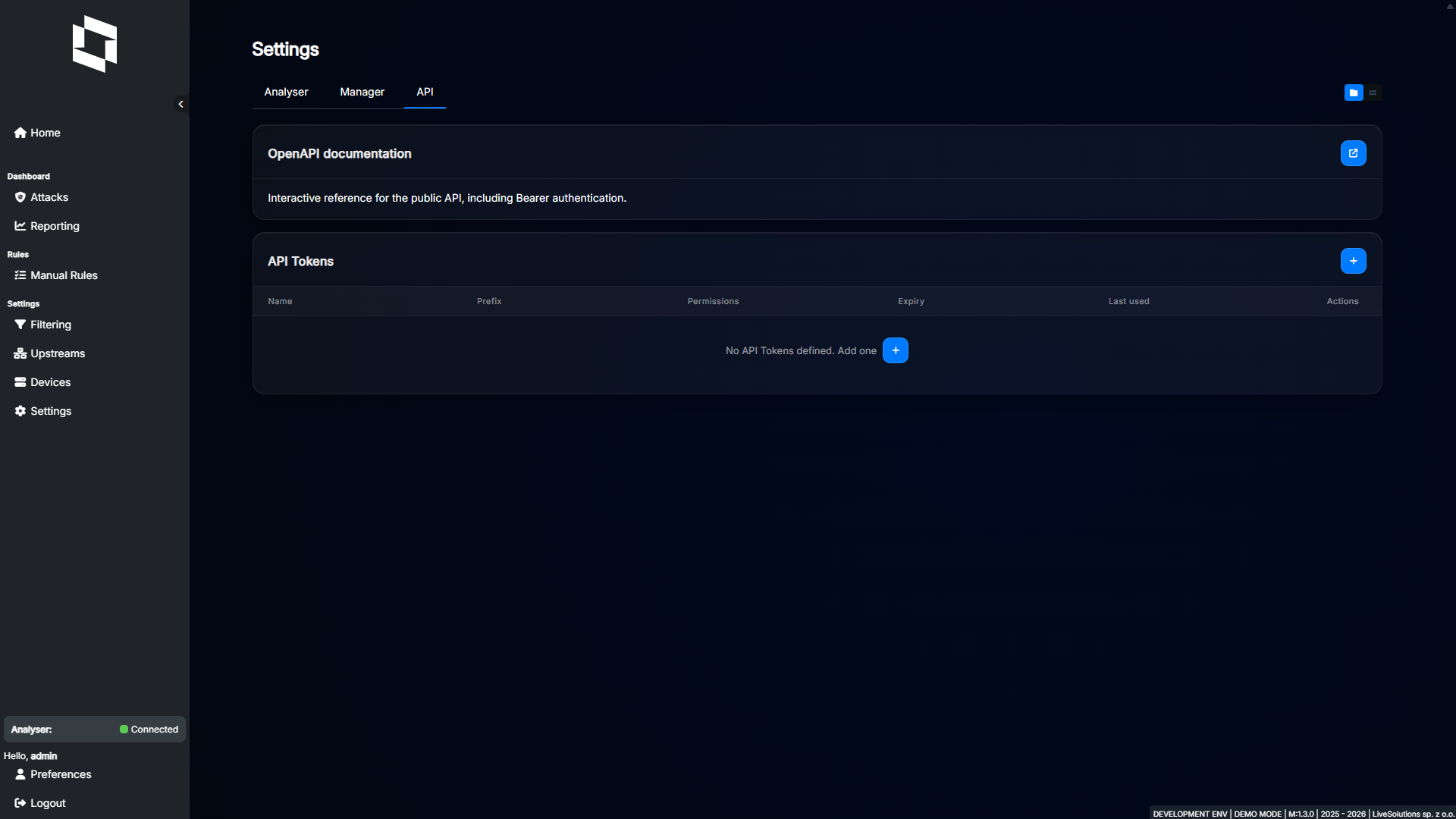
Log in as an Administrator, open Settings > API, and click “+”.
Settings explained:
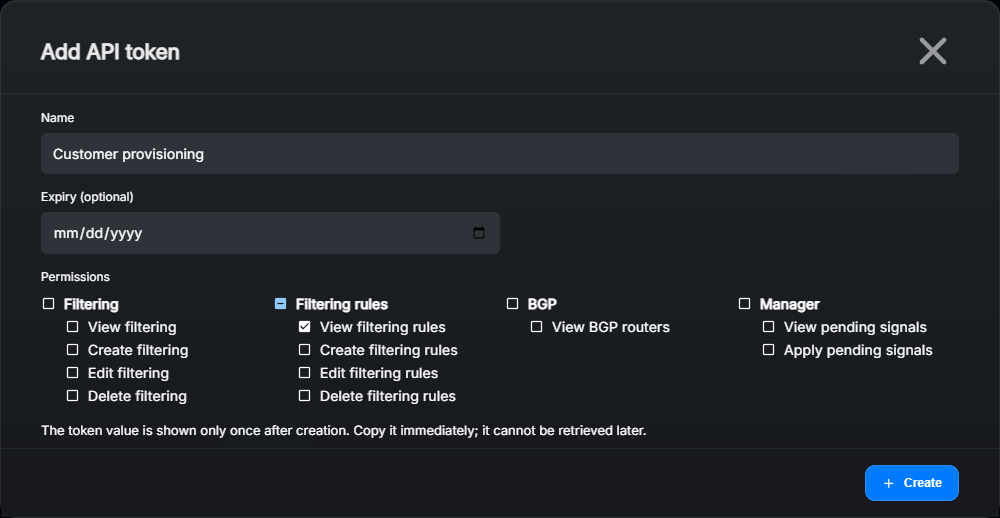
Name: A descriptive name for the integration, such as
Customer provisioning.Expiry (optional): Select an expiry date, valid through the end of that day in your browser’s local time. Leave it blank for no expiry.
Permissions: Select at least one permission. Choose only those needed by the integration. Selecting a modifying permission also selects the corresponding View permission.
Click Create and copy the token from the popup. The full token is shown only once. Store it securely; if you lose it, revoke it and create a replacement.
The token list shows identifying information, permissions, expiry, and last use. Last-use updates may be delayed by about a minute. To stop an integration’s access, use the token’s revoke action and confirm it. Revoked or expired tokens receive HTTP 401 on authenticated requests.
Important
API tokens have their own permissions. They are not limited by a user’s Specific access assignments. A token with permission to list prefixes can list all prefixes. Revoking a user’s resource access is not a substitute for revoking an integration token.
Choosing permissions#
Filtering rules: View filtering rules, Create filtering rules, Edit filtering rules, and Delete filtering rules control
/prefixes. Their API names arefilteringRuleView,filteringRuleCreate,filteringRuleEdit, andfilteringRuleDelete.Filtering: View filtering (
filteringView) allows reading templates, Advanced Filtering Profiles, Blackholing Profiles, and Event Pipelines. Create filtering, Edit filtering, and Delete filtering control template writes throughfilteringCreate,filteringEdit, andfilteringDelete.BGP: View BGP routers (
bgpRouterView) allows reading routers and their sessions.Manager: View pending signals (
managerView) allows inspecting queued configuration changes. Apply pending signals (managerEdit) allows sending them to Analyser.
For the create-and-update examples below, select View, Create, and Edit in both Filtering groups. Add both Manager permissions if the integration will also apply configuration. Delete permissions are only needed for deletion.
Authentication and reading resources#
The examples use Bash and curl. Set your Manager URL and read the token without displaying it or placing it directly in shell history:
MANAGER_URL='https://manager.example.com'
read -r -s -p 'API token: ' API_TOKEN
printf '\n'
Replace the example hostname with your own. Requests to protected endpoints must include Authorization: Bearer <token>; a browser login session is not a replacement for an API token.
Check the token and list configured prefixes:
curl --fail-with-body "$MANAGER_URL/api/v1/me" \
  -H "Authorization: Bearer $API_TOKEN"

curl --fail-with-body "$MANAGER_URL/api/v1/prefixes" \
  -H "Authorization: Bearer $API_TOKEN"
The list response is a JSON array. Use GET /api/v1/prefixes/<id> for one prefix. Resource IDs come from API responses; they are not IP addresses or CIDRs.
Other read endpoints are /prefix-templates, /advanced-filtering-profiles, /blackholing-profiles, /bgp-routers, and /event-pipelines. Each supports a list and an individual /<id> lookup. Use these to find IDs referenced by a prefix or template.
GET /api/v1/health, the Swagger UI, and the OpenAPI specification are available without a Bearer token. The health endpoint is a Manager liveness check, not confirmation that Analyser or Workers are ready.
Creating and updating configuration#
The examples below save configuration in Manager. Applying it to Analyser is a separate step described under Applying pending changes.
Create a prefix#
This example creates 192.0.2.0/24 without detection thresholds, diversion, or a blackholing profile. It demonstrates the required request structure; configure suitable thresholds before using it for automatic detection.
curl --fail-with-body -X POST "$MANAGER_URL/api/v1/prefixes" \
  -H "Authorization: Bearer $API_TOKEN" \
  -H 'Content-Type: application/json' \
  --data '{
    "name": "Customer A",
    "prefix": "192.0.2.0/24",
    "maximumTimeout": 300,
    "dumpPacketCount": 0,
    "blackholingProfileId": null,
    "trafficDiversion": null,
    "templateId": null,
    "thresholds": [],
    "bgpRouterIds": [],
    "eventPipelineSettings": {
      "pipelineId": null,
      "overrideEmail": null,
      "overrideWebhookUrl": null
    }
  }'
Success returns HTTP 201 and the created prefix, including its id. Save that ID for later requests. The prefix CIDR must be unique.
Create a template#
Templates use /prefix-templates and do not have a prefix or templateId field. This example creates an initially empty template; add your thresholds before assigning it to production prefixes.
curl --fail-with-body -X POST "$MANAGER_URL/api/v1/prefix-templates" \
  -H "Authorization: Bearer $API_TOKEN" \
  -H 'Content-Type: application/json' \
  --data '{
    "name": "Customer defaults",
    "maximumTimeout": 300,
    "dumpPacketCount": 0,
    "thresholds": [],
    "bgpRouterIds": [],
    "eventPipelineSettings": {
      "pipelineId": null,
      "overrideEmail": null,
      "overrideWebhookUrl": null
    }
  }'
Success returns HTTP 201 with the template ID. A prefix can reference a template through templateId. See Templates for inheritance and overrides.
Update individual fields with PATCH#
Replace the example IDs with those returned by your Manager. These requests rename the prefix and change the template timeout:
PREFIX_ID=123
TEMPLATE_ID=456

curl --fail-with-body -X PATCH "$MANAGER_URL/api/v1/prefixes/$PREFIX_ID" \
  -H "Authorization: Bearer $API_TOKEN" \
  -H 'Content-Type: application/json' \
  --data '{"name": "Customer A production"}'

curl --fail-with-body -X PATCH "$MANAGER_URL/api/v1/prefix-templates/$TEMPLATE_ID" \
  -H "Authorization: Bearer $API_TOKEN" \
  -H 'Content-Type: application/json' \
  --data '{"maximumTimeout": 600}'
Success returns HTTP 200 with the updated resource. PATCH updates only supplied scalar fields. Examples include name, maximumTimeout, dumpPacketCount, and trafficDiversion. Prefix PATCH also supports prefix and templateId; template PATCH does not.
Applying pending changes#
Inspect queued configuration changes before applying them:
curl --fail-with-body "$MANAGER_URL/api/v1/pending-signals" \
  -H "Authorization: Bearer $API_TOKEN"
The response contains count (pending signal rows) and types (unique queued message types). With Apply pending signals permission, send:
curl --fail-with-body -i -X POST "$MANAGER_URL/api/v1/pending-signals/apply" \
  -H "Authorization: Bearer $API_TOKEN"
Success returns HTTP 204 with no response body. This sends all pending configuration signals, including changes made in the web interface or by other integrations. It is not limited to this token’s most recent request.
Analyser must be connected, meet the minimum supported version (1.3.1 for Manager 1.3.0), and accept the Manager version. Otherwise Apply returns HTTP 400 with an explanation. Correct the connection or version incompatibility and retry Apply; do not recreate a resource that was already saved successfully.
An Administrator can also apply the pending changes through the sidebar Apply button in Manager.
Errors and troubleshooting#
API errors use a JSON envelope with error.code, error.message, and error.details. Validation details can include a field name and message.
400 / validation: Invalid fields, duplicate threshold protocols, nested fields sent with PATCH, or Analyser not ready for Apply. Read the message and field details.
401 / unauthorized: Missing, invalid, expired, or revoked token. Check the Bearer header and token status.
403 / forbidden: The token lacks the endpoint’s required permission. Resource-writing permission does not include permission to apply pending signals.
404 / not_found: The resource ID does not exist or refers to the wrong resource type, such as a normal prefix requested through the template endpoint.
409 / conflict: A conflicting resource, such as an already configured prefix. Read the existing resource before deciding whether to update it.
405 / method_not_allowed: The requested HTTP method is not supported.
500 / internal_error: Manager could not complete the operation. Inspect the saved configuration and pending signals before retrying a write; contact support if the problem persists.
Use Account management for web-user permissions and Updating for component compatibility. These are separate from API token permissions.