Licensing#
Introduction#
After installing the software, it’s necessary to obtain and activate a valid license.
License can be obtained through a sales representative or partners. You can contact us through the form on the https://liveshield.net website or directly via email at license@liveshield.net.
Without a valid license, LiveShield will not analyse any traffic. Also, no worker will be able to send statistics.
Each license is enforced on the Analyser module. It’s paired to a specific hardware token, so moving it to another machine requires obtaining a new license.
What is checked in the license:
Hardware token ID
Validity period (start and end date)
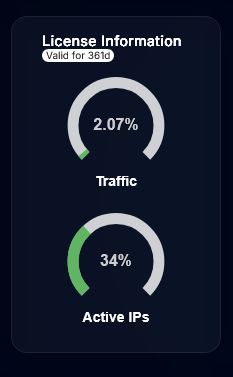
Maximum analysed traffic
Maximum active IP addresses
Maximum analysed traffic is the maximum traffic that can be analysed by the Analyser module. During short attack spikes, it’s possible to exceed this limit, but after 10 minutes of continuous overuse, the module will stop analysing only the excess traffic.
Important
Exceeding traffic limits may lead to incomplete attack mitigation and should be avoided. Please contact us, we’ll discuss possible solutions.
Maximum active IP addresses is the maximum number of destination IP addresses that can be analysed per second. This means that if you own a huge subnet (e.g. /16) and only 1000 addresses have received any packet in the last second, only these 1000 addresses will be counted towards the limit. If you exceed this limit for more than 5 minutes, analysis will be throttled to fit the limit.
Important
Exceeding active IP addresses limit will lead to incomplete attack detection and mitigation. You may miss attacks on some of your addresses. Please contact us to discuss possible solutions.
Installation#
First, log in to the Web UI provided by the Manager module, navigate to the Settings section from the main menu and then to the Analyser tab.

The most important part here is to retrieve Device serial and provide it to us or our partner in order to obtain a valid license file.
Once you have the license file, upload it using the “Upload License” button. After uploading and applying changes, you should see the following status:

License usage can be also monitored on dashboard:
Call-home#
By default and according to the EULA, LiveShield periodically contacts our license server to verify the license validity and provide some telemetry data.
What kind of data is sent:
Full license data (hardware token ID, limits, validity period)
Software version
Number of attacks detected in the last period
Maximum active IP addresses in the last period
Maximum analysed traffic in the last period
Number of workers
Data is sent only from the Analyser module, using the HTTPS protocol. It’s sent once every 1 hour.
Important
It’s required to have at least one active call-home within a 24h period to keep the license valid. Otherwise, the license will be invalidated and analysis will stop.
Note
If your organization’s policies forbid call-home functionality, we can provide you with a license that doesn’t contact our server. Please contact us via email license@liveshield.net or office@liveshield.net for more details.